The Tao of Deluge
Concept
In September of 2024, Hurricane Helene struck the United States, particularly the Southeastern region. This region of the country, a place I call home in East TN and Western NC, is not used to dealing with such a major storm.


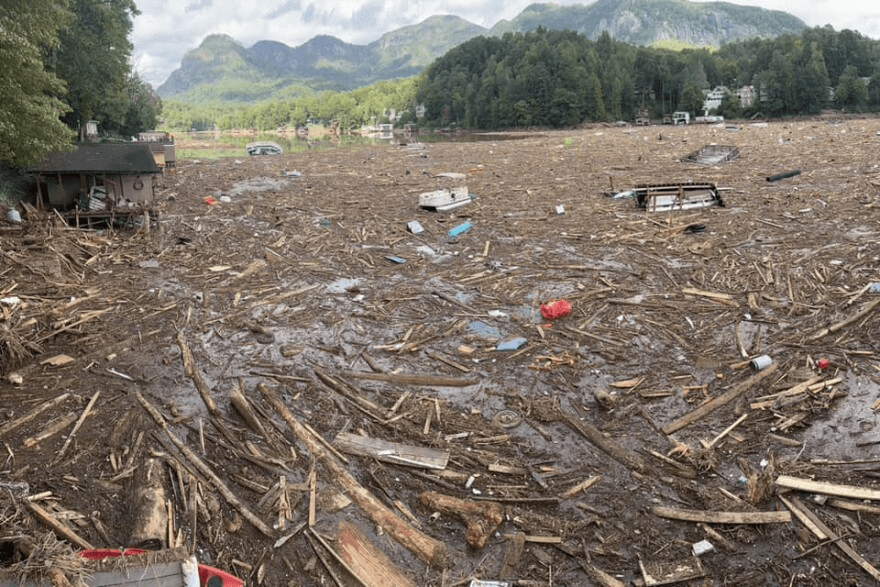



While away at a school here at NYU, I had many friends who dealt with the consequences of the hurricane, which took lives, decimated whole towns, damaged a lot of infrastructure and ecologies, and impoverished the Appalachian region, already among the poorest in the nation. I wanted to help, I made donations, but what could I really do? I could not help rebuild nor run supplies to people as my friends volunteered to do. How could I help? This question lodged itself in my mind, inspiring code art for my ICM class.
After a week or so, I noticed that even I was forgetting what happened with the hurricane or what towns got affected. I noticed at school that people were moving on from the event, digesting as the news of the week that is chockfull of disasters these days. But I could not move nor can anyone who has a close proximity to such events. I fully realized a privilege I once had but that climate change is sweeping away. As someone from Appalachia, I never thought the region could be hurt by a hurricane or weather calamity. I thought it was stable. With climate change and all the interconnected consequences of our industries and governments, nowhere is safe.
For Hypercinema class, reading about the work of Betye Saar and Joseph Cornell struck me. They used collage to enshrine moments in time. Their art connected things long forgotten or ignored or unappreciated, all together in assemblage. How could I make something to remember the places affected by Hurricane Helene? and together? How could I enshrine the moment of desolation but also the moments of people coming together, putting aside any difference, helping each other sort through the mess?
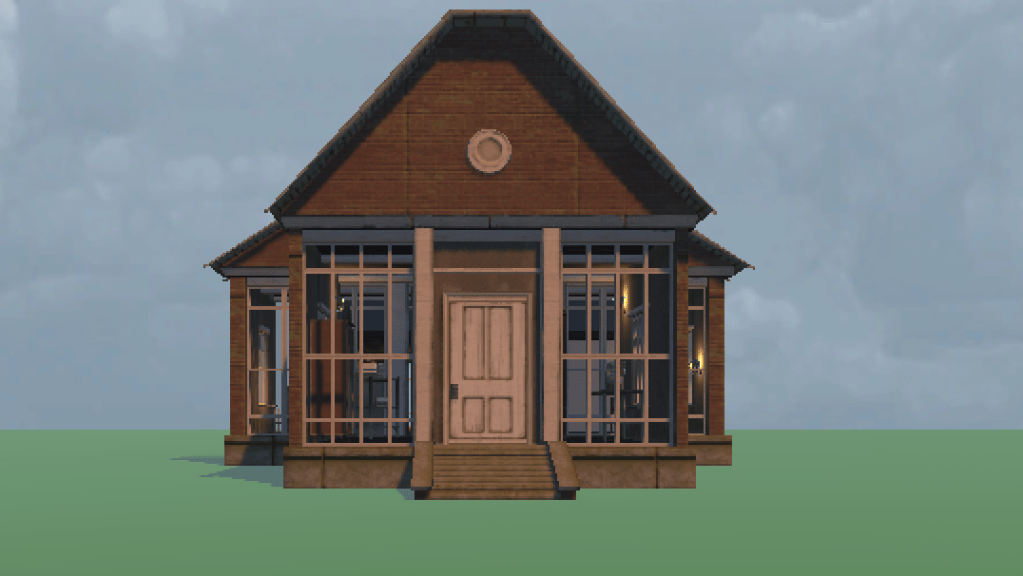
Building a 3D interactive experience/memory box in Unity presented an opportunity to confront how to remember a space how it actually was spatially. I set to building an experience of someone walking through a home, familiarizing themselves with the details and care poured into it by a human, and have that be washed away, having to find what was lost, having to grapple with what was thrust upon them.
Process
Unity has a steep learning curve, it turns out. While Ali taught us the basics of bringing shapes and assets into Unity well, I was overwhelmed at how to approach my idea. I wanted objects scanned in (easy enough), a house built (pretty tough), a house decorated (annoying and time-consuming), and a flood activated (what) after picking up enough objects (how in the world). There is only so much time in the day to learn unfortunately.
For scanning objects, I used the Niantic app, Scaniverse. This was easy to use and pretty straightforward. It took some time to figure out how to import each scanned object into unity with the right texture. Eventually, I figured out how to use Blender to make the .obj file into a .dae file and brought in the textures as images in a way that Unity liked.

Building the house in Unity was not as tough as I expected. This is all thanks to the plentiful free assets in the Unity Store. A huge thank you in particular to Sandro T for the Flooded Grounds asset pack . That humongous and free asset pack served as the foundation for every part of the house. Sandro made this project possible at all.

In Unity, activating a flood by picking up objects is insanely hard to do (at least for a beginner like me). I genuinely had no idea to approach this. Due to this inexperience and small time frame, I went against my environmental concerns with AI and used Claude.AI a lot to help me figure out how to do any of this. Claude helped a lot. Claude also confused the hell out of me because it would give me code to copy and paste in Unity. Do not do this with AI because each time something doesn’t work it, the AI will have you copy and paste again even thought it got rid of one crucial part that you wanted to keep. Thankfully, I knew enough code to eventually figure out how to keep both the flood and objects pickup to work together. But it was a long, hard-fought, sleep-deprived battle.
Example code of making an object Pickable (have to assign it the script in Inspector.

using UnityEngine;

// public enum PickableTag
// {
//     Pickable,
//     Unpickable
// }

public class PickableObject : MonoBehaviour
{
    [Header("Pickable Object Settings")]
    public PickableTag objectTag = PickableTag.Pickable;

    [Header("Highlight Settings")]
    public Color highlightColor = Color.yellow;

    private Renderer objectRenderer;
    private MaterialPropertyBlock propertyBlock;
    private Material originalMaterial;
    private Material highlightMaterial;

    void Start()
    {
        // Ensure the object has a Rigidbody for pickup
        if (GetComponent<Rigidbody>() == null)
        {
            Rigidbody rb = gameObject.AddComponent<Rigidbody>();
            rb.mass = 1f;
            rb.linearDamping = 0f;
            rb.angularDamping = 0.05f;
        }

        // Setup highlight components
        objectRenderer = GetComponent<Renderer>();
        propertyBlock = new MaterialPropertyBlock();

        // Store original material
        if (objectRenderer != null)
        {
            originalMaterial = objectRenderer.material;
        }

        // Create highlight material
        CreateHighlightMaterial();
    }

    void CreateHighlightMaterial()
    {
        // Create a new material for highlighting
        highlightMaterial = new Material(Shader.Find("Universal Render Pipeline/Unlit"));
        highlightMaterial.SetColor("_BaseColor", highlightColor);
    }

    public void Highlight()
    {
        if (objectRenderer == null || objectTag != PickableTag.Pickable) return;

        // Change material to highlight material
        objectRenderer.material = highlightMaterial;
    }

    public void RemoveHighlight()
    {
        if (objectRenderer == null || objectTag != PickableTag.Pickable) return;

        // Restore original material
        objectRenderer.material = originalMaterial;
    }
}
And here’s how I currently have the Flood triggered after objects get picked up:
I made an Empty GameObject and called it Flood.
With Claude’s help, I added the FloodController script to it as well as a Video Trigger.
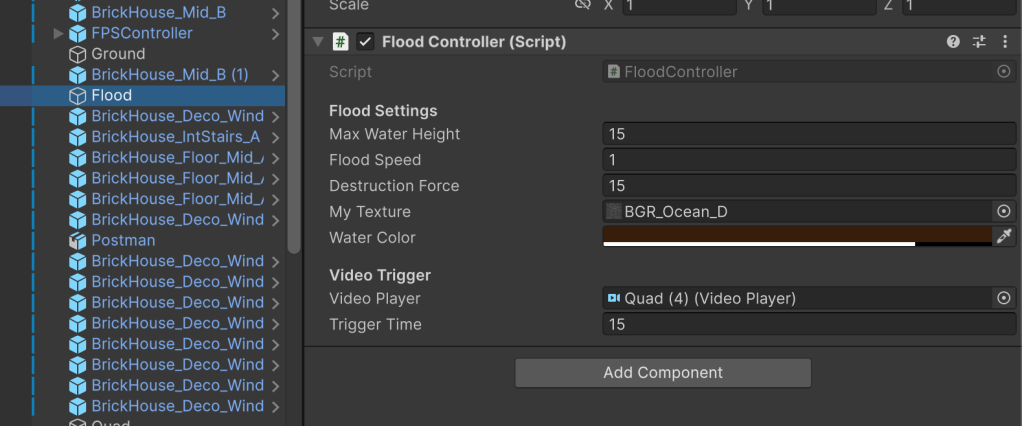
using UnityEngine;
using System.Collections.Generic;
using UnityEngine.Video;

// // Advanced water shader with normal mapping and fresnel effects
// public class WaterShader : MonoBehaviour
// {
//     [Header("Water Appearance")]
//     public Color deepColor = new Color(0.0f, 0.2f, 0.4f, 0.9f);
//     public Color shallowColor = new Color(0.0f, 0.4f, 0.7f, 0.7f);
//     public float fresnelPower = 2.0f;
//     public float normalStrength = 0.5f;

//     private Material waterMaterial;

//     void Start()
//     {
//         // waterMaterial = new Material("water");
//         // waterMaterial.EnableKeyword("_NORMALMAP");
//         // waterMaterial.SetColor("_DeepColor", deepColor);
//         // waterMaterial.SetColor("_ShallowColor", shallowColor);
//         // waterMaterial.SetFloat("_FresnelPower", fresnelPower);
//         // waterMaterial.SetFloat("_NormalStrength", normalStrength);

//           // Set up water material
//         waterMaterial = new Material(Shader.Find("Standard"));
//         waterMaterial.color = waterColor;
//         waterMaterial.SetFloat("_Glossiness", 0.8f);
//         waterMaterial.SetFloat("_Metallic", 0.2f);
//         waterMaterial.renderQueue = 3000; // Render after opaque objects
//         GetComponent<MeshRenderer>().material = waterMaterial;
//     }
// }


// Enhanced flood controller that manages all systems
public class FloodController : MonoBehaviour
{
    public static FloodController instance;

    [Header("Flood Settings")]
    public float maxWaterHeight = 10f;
    public float floodSpeed = 1f;
    public float destructionForce = 15f;

    public Texture myTexture;


    [SerializeField] public Color waterColor = new Color(0.2f, 0.5f, 0.8f, 0.8f);


    [Header("References")]
     GameObject waterPlane;
    // private WaterShader waterShader;
     Material waterMaterial;

     [Header("Video Trigger")]

     public VideoPlayer videoPlayer;
    public float triggerTime = 5f; // Time in seconds when the event should trigger
   // public UnityEvent onVideoTimeReached;

    private bool hasTriggered = false;


    private float currentWaterLevel;

    void Awake()
    {
        instance = this;
    }

    void Start()
    {
        SetupWater();
        currentWaterLevel = -1f;

    }

    void Update()
    {
        //UpdateFlood();


        // Check if video is playing and we haven't triggered the event yet
        if (videoPlayer != null && videoPlayer.isPlaying)
        {
            // Get current time of the video
            double currentTime = videoPlayer.time;

            // Check if current time has reached or passed the trigger time
            if (!hasTriggered && currentTime >= triggerTime)
            {
                // Trigger the event
                //onVideoTimeReached.Invoke();

                hasTriggered = true;
            }


        }

        if (hasTriggered){
            UpdateFlood();
            CheckForDestructibles();
        }
    }
 public void ResetTrigger()
    {
        hasTriggered = false;
        currentWaterLevel -= floodSpeed * Time.deltaTime;
        waterPlane.transform.position = new Vector3(0, currentWaterLevel, 0);
    }


     void SetupWater()
    {
        waterPlane = GameObject.CreatePrimitive(PrimitiveType.Plane);
        waterPlane.transform.parent = transform;
        waterPlane.name = "FloodWater";

          // Set up water material
        waterMaterial = Resources.Load("water", typeof(Material)) as Material;

        waterMaterial.color = waterColor;
        waterMaterial.SetTexture("_MainTex", myTexture);
        waterMaterial.SetFloat("_Glossiness", 0.8f);
        waterMaterial.SetFloat("_Metallic", 0.2f);

        waterMaterial.SetInt("_SrcBlend", (int)UnityEngine.Rendering.BlendMode.SrcAlpha);
        waterMaterial.SetInt("_DstBlend", (int)UnityEngine.Rendering.BlendMode.OneMinusSrcAlpha);
        waterMaterial.SetInt("_ZWrite", 0);
        waterMaterial.DisableKeyword("_ALPHATEST_ON");
        waterMaterial.EnableKeyword("_ALPHABLEND_ON");

        waterMaterial.renderQueue = 3000; // Render after opaque objects

        // Apply material and settings
        // waterPlane.GetComponent<MeshRenderer>().material = waterMaterial;
        // waterPlane.GetComponent<MeshRenderer>().shadowCastingMode = UnityEngine.Rendering.ShadowCastingMode.Off;

         // Apply material and settings
        var renderer = waterPlane.GetComponent<MeshRenderer>();
        renderer.material = waterMaterial;  // Apply the material to the MeshRenderer
        renderer.shadowCastingMode = UnityEngine.Rendering.ShadowCastingMode.Off;


        waterPlane.transform.position = new Vector3(0, -1, 0);
        waterPlane.transform.localScale = new Vector3(10, 1, 10);
    }

    private void UpdateFlood()
    {
        if (currentWaterLevel < maxWaterHeight)
        {
            currentWaterLevel += floodSpeed * Time.deltaTime;
            waterPlane.transform.position = new Vector3(0, currentWaterLevel, 0);
        } else {
            ResetTrigger();
        }


    }

     void CheckForDestructibles()
    {
        // Check for objects that should be destroyed by water force
        Collider[] colliders = Physics.OverlapSphere(
            waterPlane.transform.position,
            waterPlane.transform.localScale.x * 5f
        );

        foreach (Collider col in colliders)
        {
            Destructible dest = col.GetComponent<Destructible>();
            if (dest != null && col.transform.position.y <= currentWaterLevel)
            {
                // Calculate water force based on flood speed and height
                float waterForce = floodSpeed * (currentWaterLevel - col.transform.position.y);
                if (waterForce > destructionForce)
                {
                    dest.Break();
                }
            }
        }
    }

    public float GetWaterLevel()
    {
        return currentWaterLevel;
    }


} Ryan Rotella
Leave a comment