Output
Process
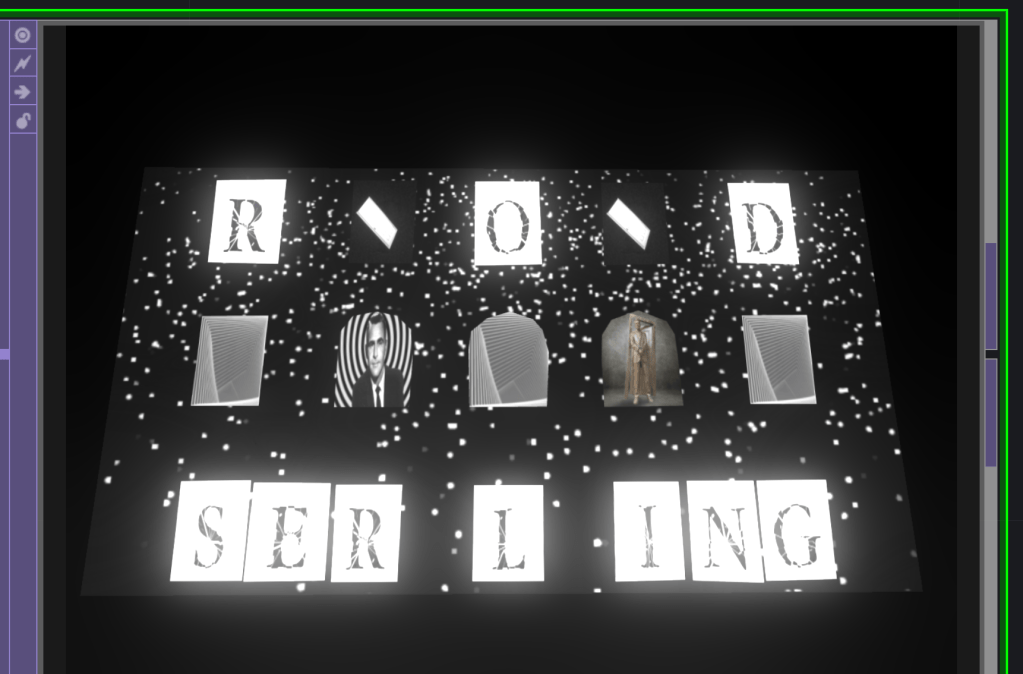
After iterating more, I designed a more direct and “simplified” version of my projection.
I decided to use text to spell out exactly who I’m referencing so nothing gets lost to subtlety. I also included pictures of Rod Serling, including one of his statue with the famous Twilight Zone door behind him.
Moreover, I reference the original Twilight Zone intro more directly. I included an animation of the door spinning, a particle generated set of stars to match the intro’s background, and moving eyes.
Instead of having 3 different portal effects, I chose 1 to show, the simple Feedback portal made by Shrek-L that I reference in my last post. In fact, the portals became a background character, as the text, eyes, and lattice became the most prominent features of the piece.
Having everything in monochrome until the change in the animation also delivers a bigger impact than having too many effects at once. Though I am still concerned that there might be too much going on, I’m happy with this version.
My File
This file includes all the image, video, font, and 3D assets I used in the project.
I did my best to clean up this network, but it is still confusing to parse. Working with text on a letter by letter basis in TouchDesigner is very tedious. I’m sure there’s a better way to have gone about it, but for mapping purposes, I wanted to have control over each letter’s placement. I also had wired things up a certain way and didn’t want to destroy what I had built while organizing. I’ve learned it’s important to be organized before starting any connections!
 Ryan Rotella
Leave a comment